• About
  • Services
  • Contact

Posts Categorized: Web

cnnet-china.com Domain Name Prospecting Scam

By Jeff King In Web Posted August 1, 2012 No Comments

I received an email today from cnnet-china.com. This scam has been around for a while, but it’s the first time I recall receiving one of these emails. For detailed info and to see what happens if you actually respond, see Christopher Woods’s excellent post: Chinese domain name prospecting scam – it’s back.

The full text of my the email I received:

[blockquote]From: “Mark Yang”
Date: August 1, 2012 3:23:40 AM EDT
Subject: Regarding ” jeffking” Dispute
Reply-To: mark.yang@cnnet-china.com

(If you are not in charge of this please transfer this email to your President or appropriate person, thanks)

Dear President,

We are the department of Asian Domain registration service in china, have something to confirm with you. We formally received an application on July 31.2012. One company which self-styled “Mega Investment Co., Ltd” were applying to register “jeffking” as Network Brand and following domain names:

jeffking.asia
jeffking.cn
jeffking.com.cn
jeffking.com.tw
jeffking.hk
jeffking.in
jeffking.net.cn
jeffking.org.cn
jeffking.tw

After our initial checking, we found the name were similar to your company’s, so we need to check with you whether your company has authorized that company to register these names. If you authorized this, we will finish the registration at once. If you did not authorize, please let us know within 7 workdays, so that we will handle this issue better. Out of the time limit we will unconditionally finish the registration for “Mega Investment Co., Ltd”.

Best Regards,

Mark Yang

Registration Dept.

Tel: +86 28 8315 5738 || Fax: +86 28 8315 5738
Address:21/F Dongcheng International No,98 XiAn Road,Jin Niu District,Chengdu City,China.
[/blockquote]

domain name, scam

How to know if you have a healthy website

By Jeff King In Web Posted May 15, 2012 No Comments

Anyone who’s been alive for at least a few years knows what it feels like to be sick and what it feels like to be healthy. Eventually this personal experience leads to an understanding of the signs of sickness and health. It even helps us learn how to tell when other people around us are sick or healthy.

The health of a website — just like our personal health — is a system of systems that fluctuates over time in response to internal and environmental factors. With experience, we can learn how to tell when a website is sick or healthy.

Unfortunately, many websites are stuck in a “failure to thrive” mode and have never experienced a healthy cycle. Therefore, many business owners have not experienced their own websites in a healthy state. They might perceive the unhealthy state as being normal.

What does a website do when it’s in good health? How does it function?

It functions as an integral part of your overall business health. In other words, business would suffer if the website was not there. The website does not just sit there and do nothing. It does not merely point to your business like an ad, a business card or brochure.

You know you have a healthy, viable website when . . .

  • You are not embarrassed to show your website to customers or prospects. You encourage people to visit your website because you know that it is current, relevant, and useful.
  • You can trace new business and new customer inquiries back to your website. The website directly contributes to online or offline sales, new customers and new conversations. You know for a fact that these results come from the website because you have a tracking system in place. This can be as simple as asking customers how they found out about you while you’re still on the phone with them. Or before they walk out of your door. Or as part of your response to their email inquiry.
  • You have inactive customers re-engaging with your business. Or you have current customers engaging more often as a direct result of your website and your online efforts, including email programs. Again, this can be traced directly back to your website because you have systems in place to measure those results.
  • If you have a membership site or organization, it is easy to acquire and retain members because you have online systems that simplify customer service and member management.
  • It is easy for customers to pay for products and services on your website. The website allows you to process more orders in less time.
  • You spend less time on the telephone providing general information and explaining policies and procedures because that information is easily found on the website.

These are just a few indications that your website is healthy and viable. A healthy website is part of your business. It serves an important role in customer acquisition and creates income. It is not something that just consumes resources without making a discernable difference.

Is this a pipe dream or is it reality?

If you have not yet experienced this with your website, you can call me to find out why. I will ask some questions and provide concrete, actionable feedback. There is no obligation to work with me, but you will find out what needs to be done. In fact, you are free to hire someone else to act on the feedback I provide. My main concern is that you understand what would make your website healthy and viable and what it would take to get it there.

Your website is increasingly the first place that new prospects and customers experience your business. Your site visitors assume that your website represents your best effort. If your website is in a coma, they will assume your business is in a coma, too. They will move along without a second thought.

Fortunately, there are ways to jolt a website out of the coma state and into a viable, vibrant, healthy life. I have helped clients do everything I’ve described above. It’s work that I find to be incredibly rewarding.

Feel free to contact me with any questions or feedback. I enjoy hearing from you.

One minute to a better website

By Jeff King In Web Posted April 15, 2012 No Comments

In just one minute you can look at your website from the perspective of your ideal client and spot any “red flag” missed opportunities to connect with them. (I like to use the word client, but you may think of them as customers, students, members, fans, etc.)

You should not spend more than one minute on this. I will explain why.

First, imagine your ideal client. . . the kind of client you could use more of. Think about what their needs are, why you are a good fit for them, and why they chose to work with you in the first place. Take one minute and visit your website from the perspective of that ideal client and ask yourself if it would connect with someone else just like them.

It’s very important to only spend one minute on this, because that’s a fairly long visit for a first-timer to your website. Most people who visit a new site for the first time only stay for a few seconds to a minute. By giving yourself only one minute to look at your website, you can get a better idea of what the typical experience is for your first-time site visitors.

Remember, you want to ask yourself if your website connects with the kind of person you would love to work with.

Take a minute and do it now . . .

OK, so now you’ve spent one minute on your website. It’s not a lot of time, and you may have noticed a few things that you want to fix.

If there is nothing there to grab your ideal client on the first visit, you may have missed your only chance to connect with them.

Recently a client looked at their site this way and realized they needed more photos. Their products and services are often sold on the basis of their visual appeal, and their website was largely missing the important element of product photos.

If you can’t find anything obvious to improve after the one minute exercise, ask yourself this question: what does your website ask your ideal client to do? Does it make any specific requests?

One way to immediately improve the performance of your website is to figure out something that you want your site visitors to do and then simply ask them to do it.

Possible calls to action include:

  • Download our worksheet.
  • Fill out this contact form.
  • Sign up for our newsletter.
  • Visit our physical location.
  • Call for more information.
  • Sign up for this free trial offer.
  • Read this article.
  • Email for info about our gift certificates.
  • Print out our coupon.
  • Call for personal assistance.

People are visiting your website to learn what they need to know and to find out how they can work with you. Does your website connect effectively with them, provide clear guidance and a simple next step?

It only takes one minute to find out. . .

You can do it yourself as explained in this email, but if you really want to receive some valuable feedback, you can ask someone else to spend one minute (and one minute only) on your website.

What to do next . . .

Visit your own website for one minute only. Send me a quick email letting me know what you discovered.

Free online photo editors

By Jeff King In Web Posted March 11, 2012 No Comments

One of the main tasks of preparing content for the web is photo editing, resizing and formatting. Photoshop is the industry standard software package used to edit graphics. However, there are simpler and less expensive options if all you need are basic tools to resize and crop images for your website or email newsletter.

The editors discussed below are all free to use. These tools work for personal emails, too. Before sending those family photos, run them through webresizer.com in order to reduce the file size. Or upload them to Pixlr Express so you can add captions.

Why do we need to resize images? Because it helps our pages and emails load faster. It standardizes the appearance of the image across browsers, platforms and devices. It saves space if your online storage provider enforces a disk quota. And it saves time for both you and your recipients. Large files take time to upload, download and open. There is no need to send 7MB photos via email when a 45kb image would suffice.

WebResizer.com

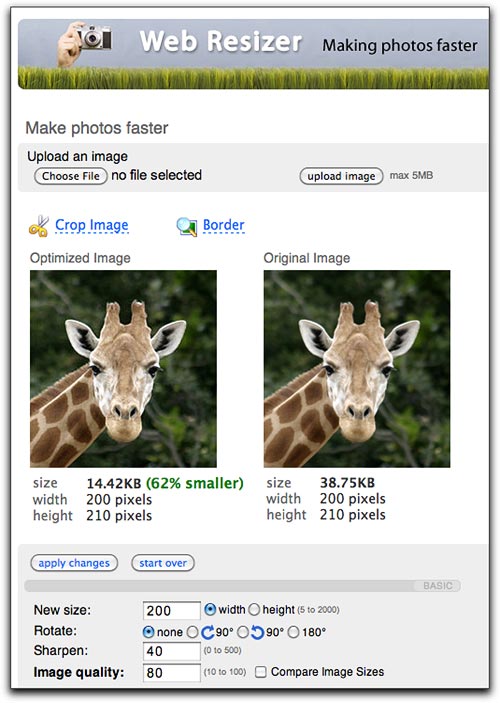
Webresizer.com provides a simple user interface allowing you to perform basic edits including cropping, rotating and resizing. If you are new to photo editing, this is what I would recommend. Merely uploading and then saving your image will reduce the file size. (You do not need to change any of the settings.)

Pixlr Express

When you are ready for something more advanced, Pixlr Express allows you not only to adjust your images, but also to add text, stylized borders and other effects. You can upload an image from your computer, type in the URL of an image you want to edit, or even capture an image from your webcam. After your image is loaded into Pixlr Express, you can add text and make your adjustments before saving as a new file.

Pixlr Editor

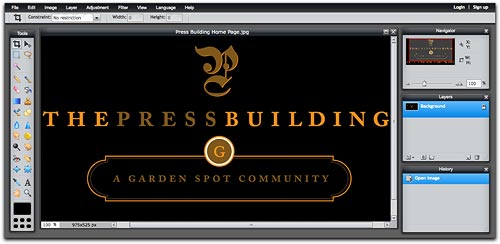
Pixlr Editor is a full-featured photo editor similar to Photoshop. It gives you many tools to edit images or create them from scratch. This is a good choice if you need the ability to make precise adjustments.

  1. 1
  2. 2
Location
Our office is in the Edgewood Executive Park on Butler Avenue, near the Lancaster Shopping Center and the intersection of Oregon Pike and Route 30.
View Map
Hours
Monday - Friday:
10AM to 6PM
Contact
202 Butler Avenue, Suite 303
Lancaster, PA 17601
(717) 723-8581
Send Email
© 2021 | Jeff King